Battery EEPROM Works3.27
Publisher Description
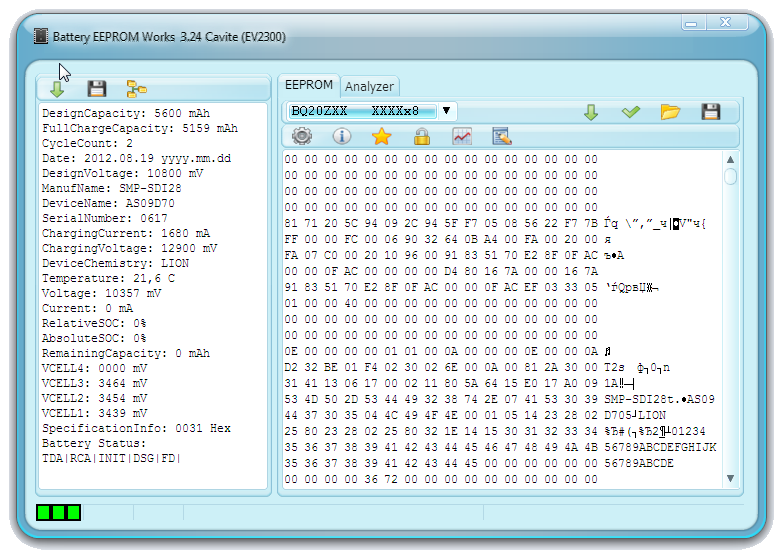
Battery EEPROM Works is designed to simplify the process of laptop battery repair. This process can be divided in two parts: cells replacement and fixing the content of EEPROM or integrated Flash of laptop battery controller. While cells replacement is easy and can be made by any technician who can work with welding machine, EEPROM fixing is very complicated and important task and can be made only by the personal with special skills and equipment. Battery EEPROM Works makes this process as easy as 1-2-3. The technician needs just to connect EEPROM chip to adapter and press the button. All the necessary work will be made by the software. The laptop battery data will look like a brand new: Full Charge Capacity will be the same as you entered and will reflect real cells capacity, Cycles Count will be set to zero, and Manufacturer Date will be changed to current system date, Permanent Failure Flag will be removed and all the additional necessary changes will be made too. Battery EEPROM Works supports a lot of laptop batteries of different manufactures
About Battery EEPROM Works
This program is available in English. It was last updated on 02 November, 2026. Battery EEPROM Works is compatible with the following operating systems: Windows.
The company that develops Battery EEPROM Works is Rafos International Engineering Lab. The latest version released by its developer is 3.27. This version was rated by 31 users of our site and has an average rating of 3.8.
The download we have available for Battery EEPROM Works has a file size of 8.4 MB. Just click the green Download button above to start the downloading process. The program is listed on our website since 2012-09-11 and was downloaded 12,807 times. We have already checked if the download link is safe, however for your own protection we recommend that you scan the downloaded software with your antivirus. Your antivirus may detect the Battery EEPROM Works as malware if the download link is broken.
How to install Battery EEPROM Works on your Windows device:
- Click on the Download button on our website. This will start the download from the website of the developer.
- Once the Battery EEPROM Works is downloaded click on it to start the setup process (assuming you are on a desktop computer).
- When the installation is finished you should be able to see and run the program.
Program Details
System requirements
Download information
Pricing
Version History
version 3.27
posted on 2012-09-11
11.09.2012
v3.27 released
Support for Vista , Win7 , Win8 added.
Cells tester added.
Bugfixing
USB interface
version 1.50
posted on
11/11/2008
v1.50
Passwords recognition function improved.
Minor bugs fixed.
20/10/2008
v1.42
Built-in passwords for BQ208X chips added (known passwords).
Waiting for battery connection function added.
DELL M37516/SL220 new firmware added.
DELL M37516/80AF new firmware added.
